How to find citation gaps in Pack Leader
Short answer: open Citation gaps in your workspace and run the check. Pack Leader searches about 35 US directories for you and each competitor: the core directories every business needs (Yelp, BBB, Facebook, Nextdoor, Yellow Pages and more) plus the ones for your industry. You then see the listings your competitors have and you don't, with must-have directories first. A check uses 120 credits and takes 1 to 3 minutes.
A citation is a listing of your business name, address and phone on another site. For which directories matter and why, read the local citations guide. This article shows how to run the check in Pack Leader and read the result.
Run the check
- In your workspace, open Citation gaps in the sidebar.
- Click Find citation gaps, then confirm. Pack Leader shows the credits it will use.
- Wait 1 to 3 minutes. The check runs in the background, so you can use other tools meanwhile.
Pack Leader compares you with the competitors in your Brand identity, up to 5. To change who you compare with, edit your competitors there first.
To run it again later, click Check again. Each check uses credits.
How the check works
For each directory, Pack Leader runs a web search for the business name and city on that directory's site. A listing found by that search counts as listed. The directory list has 24 core directories for every US business, plus a set for your industry, about 35 in total.
Search can miss a listing, for example when the name on the directory is spelled differently. That is why every result has a Check link that opens the search, so you can confirm before you act.
Read the result
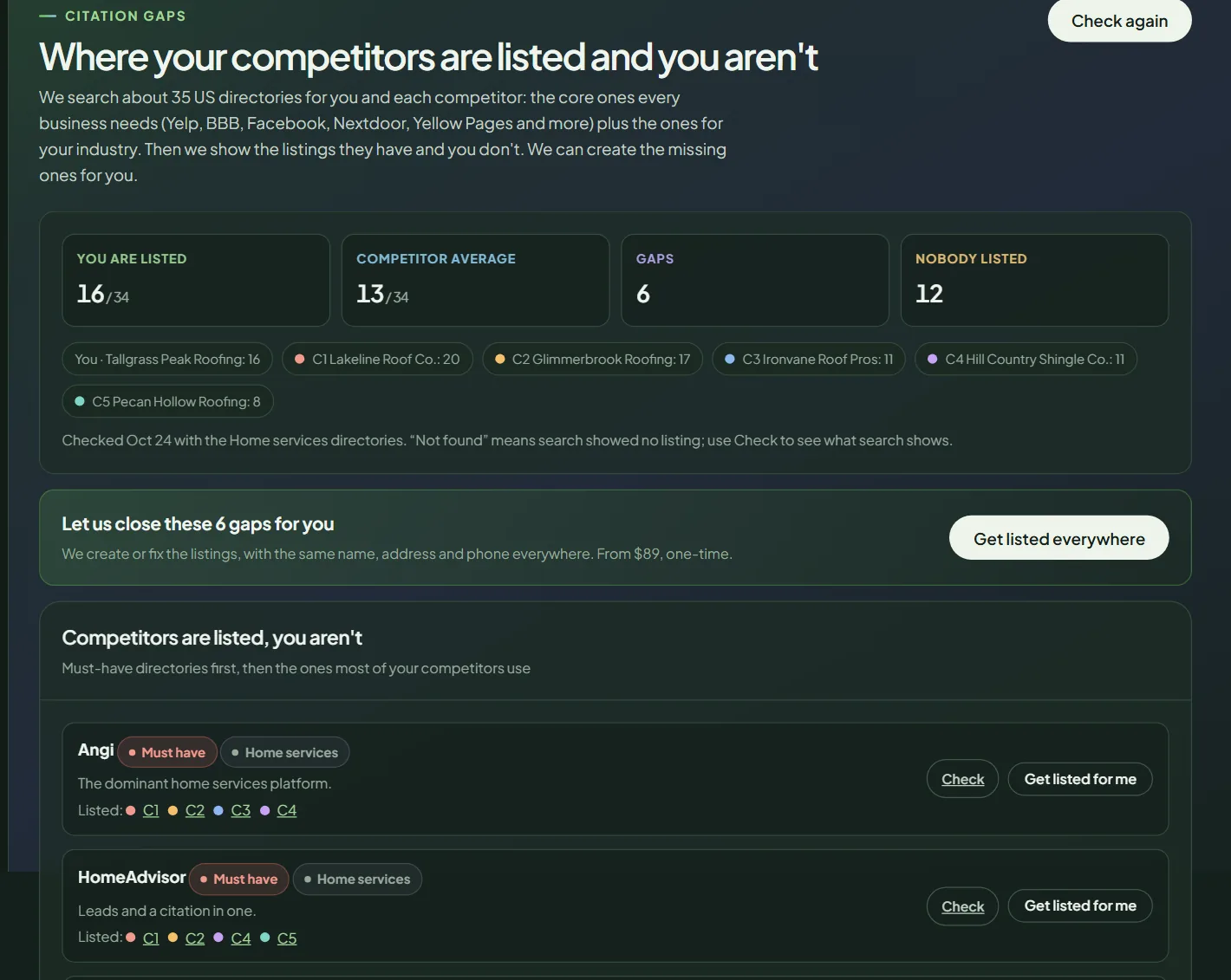 The summary and the gap list for a sample business.
The four numbers:
- You are listed: on how many directories Pack Leader found you.
- Competitor average: the same count, averaged across competitors.
- Gaps: directories where competitors are listed and you aren't.
- Nobody listed: directories where no one in your comparison is listed.
Under them you see each business's count, and the date of the check.
Competitors are listed, you aren't. This is your to-do list, with must-have directories first, then the ones most of your competitors use. Each row shows which competitors are listed, a Check link and a Get listed for me button. Priority labels are Must have, High value and Nice to have.
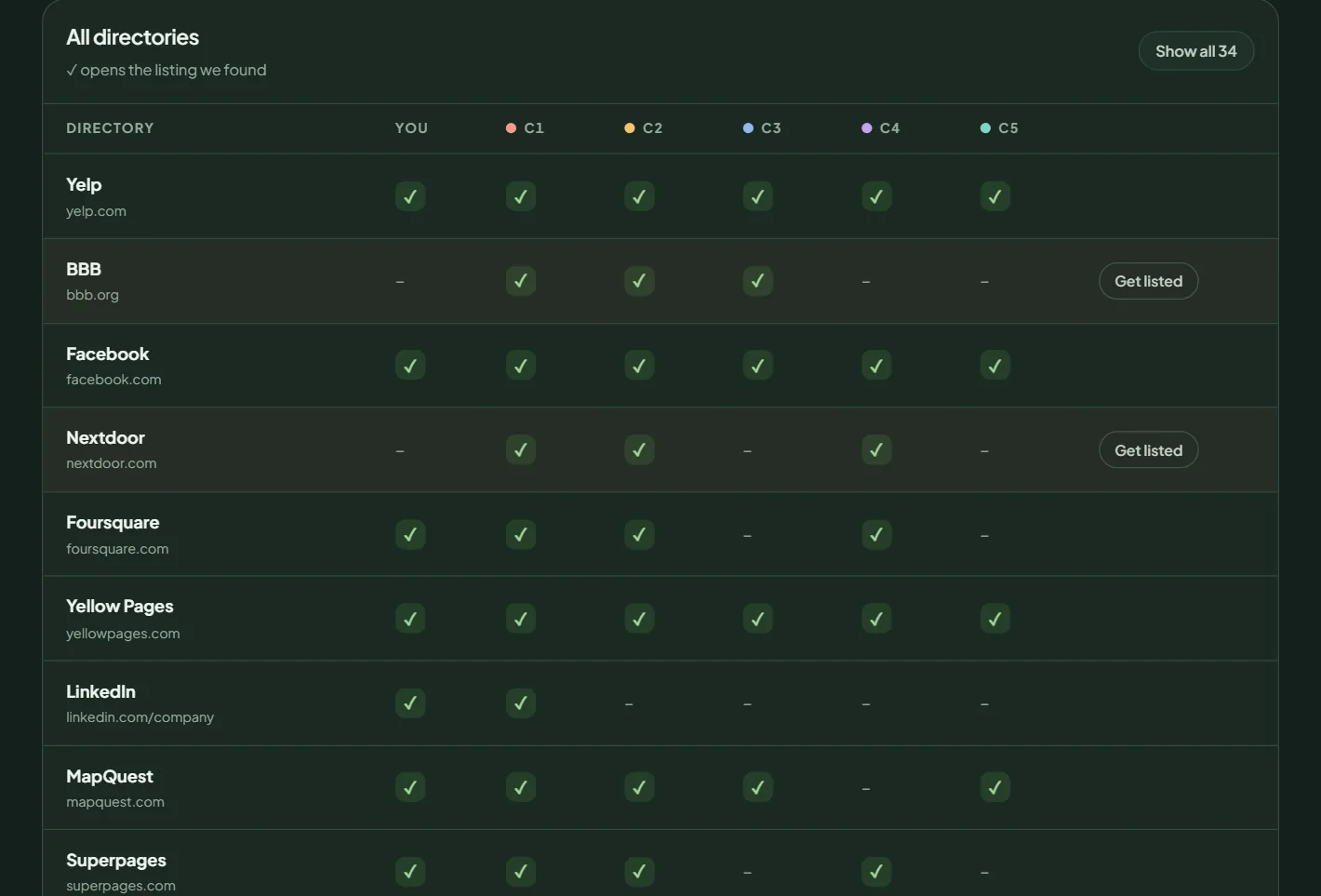 All directories. A check mark opens the listing Pack Leader found.
All directories. The full table for you and each competitor. A ✓ opens the listing Pack Leader found, and a dash means not found. Click Show all to include directories where nobody is listed.
The listings you set up yourself
Some of the most important listings need your own verification, so no search tool can check them. Pack Leader lists them under The listings you set up yourself, with a suggested week for each, and you tick them off as you go:
- Google Business Profile
- Bing Places for Business
- Apple Business Connect
- Your state's Secretary of State business registry
- Your city's business license directory
- Your local chamber of commerce
- Data Axle, Neustar Localeze and Foursquare (the data aggregators that feed many other sites)
Use the same details everywhere
Under Your listing description, click Write it for me to get a 300 character and a 750 character description with your services, your city and the towns you serve. Paste the same description on every listing that has one.
Use the same name, address and phone as your Google profile on every listing. Run the NAP check to find listings with different details.
What to do next
- Create the Must have listings first, then High value.
- Do the listings you set up yourself, starting with Google, Bing and Apple.
- Re-run the check in a few weeks to confirm the new listings are found.
- Run an AI visibility check to see which of these directories AI assistants read when they recommend businesses like yours.
If you would rather not do it yourself, the done-for-you packages create or fix the listings for you, from $89.00 one-time for 15 listings to $279.00 for 60.
Frequently asked questions
What does "Not found" mean?
The search showed no listing for that business on that directory. Search can miss a listing, so click Check to see the search yourself before you create a duplicate.
Why are some directories different from another business's report?
Every business gets the core directories, plus the directories for its industry, which Pack Leader picks from your Google category and keywords.
Can Pack Leader create the listings for me?
Yes. Click Get listed for me on a directory, or Get listed everywhere for a package. Packages are one-time and start at $89.00 for 15 listings.
How often should I check?
Re-check after you create new listings, and then about every 6 months. Each check uses credits.
Related articles
- How to read your Pack Leader gap reportWhat the gap score, the Maps ranks, the gap checklist and the action plan in your Pack Leader report mean, and which gaps to fix first.
- How to run and read an AI visibility checkSee whether ChatGPT, Gemini, Perplexity and Google AI Mode recommend your business, which competitors they name, and which sites they read.
- How credits work in Pack Leader, and what each tool usesHow many credits each Pack Leader tool uses, how many each plan includes, when credits renew, how top-ups work, and what happens when a run fails.