How to run a NAP check in Pack Leader
Short answer: open NAP check in your workspace and click Run a NAP check. Pack Leader compares your name, address and phone (NAP) on your website and on listings around the web with your Google Business Profile, looks for duplicate Google profiles, and gives you a consistency score out of 100. It uses 20 credits and takes about 30 seconds. Fix the listings marked Different first, then Partly.
NAP consistency means every site shows exactly the same business name, address and phone. Wrong or old details send calls to the wrong number and make your business harder for Google and AI assistants to trust. For which listings matter most, see the local citations guide.
Before you start
The NAP check uses the business saved in Brand identity. If your Google profile is not set there, the check stops and asks you to set it up first.
Run the check
- In your workspace, open NAP check in the sidebar.
- Click Run a NAP check, then confirm. Pack Leader shows the credits it will use.
- Wait about 30 seconds. To run it again later, click Check again.
What Pack Leader checks
- Your website: the homepage and your contact page, for your phone, address, business name, a click-to-call link, LocalBusiness schema, whether the schema phone matches Google, and a Google Map or Maps link.
- Listings around the web: the listings from your citation gap check, plus Google searches for your name with your city and for your phone number.
- Other phone numbers: numbers that show up with your name but are not yours, such as old or tracking numbers.
- Duplicate Google profiles: other Maps profiles with your phone number or your exact name.
How it compares:
- Phone: US 10 digit numbers, any format. Toll-free numbers are ignored.
- Address: a match needs the same street number plus your ZIP code or city. A service area business with no public address is not checked for address.
- Name: most words of your Google profile name must appear. Spelling variants, like different spacing or an added "LLC" or "Inc", are flagged.
Read the result
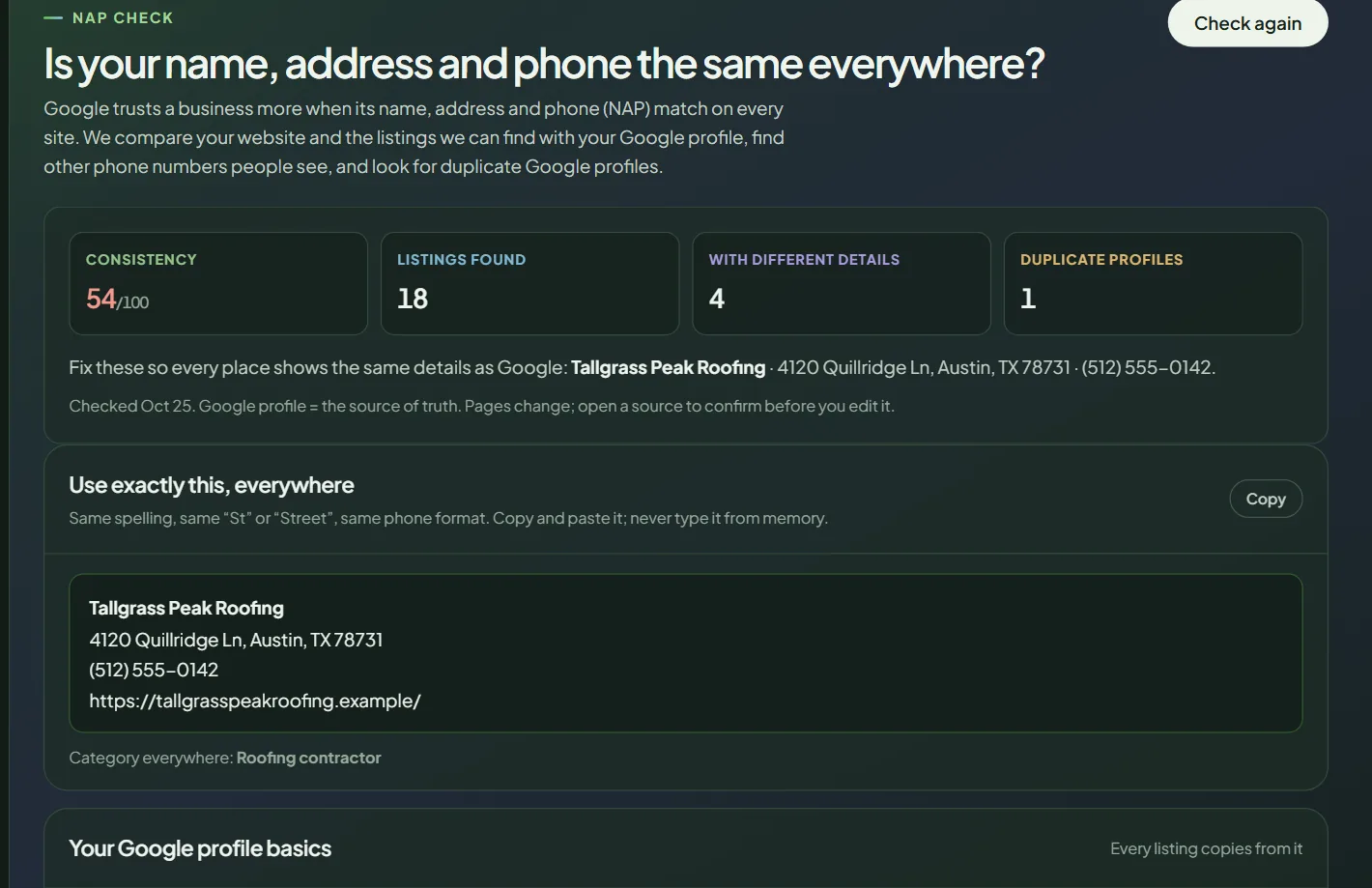 The top of a NAP check for a sample business.
The four numbers: Consistency (your score out of 100), Listings found, With different details and Duplicate profiles. The score weighs your listings and your website, and each duplicate profile lowers it.
Use exactly this, everywhere. Your name, address and phone exactly as Google shows them, with a Copy button and your category. Paste it into every listing. Never type it from memory: "St" and "Street" count as different.
Your Google profile basics. Claimed, opening hours set, at least 10 photos, primary category and website on the profile, each marked OK or Fix. Every other listing copies from your Google profile, so fix these first.
Your website. Each website check marked OK or Fix.
Schema for your homepage. Ready-made LocalBusiness code built from your Google profile, with a Copy code button. Paste it in the head of your homepage, replacing any old LocalBusiness schema.
Listings around the web. Each site with its status:
| Status | Meaning |
|---|---|
| Matches | Same details as your Google profile. |
| Partly | Some details match, others are missing or written differently. |
| Different | A different phone or address. Fix these first. |
| Not shown | No name, phone or address on the page. |
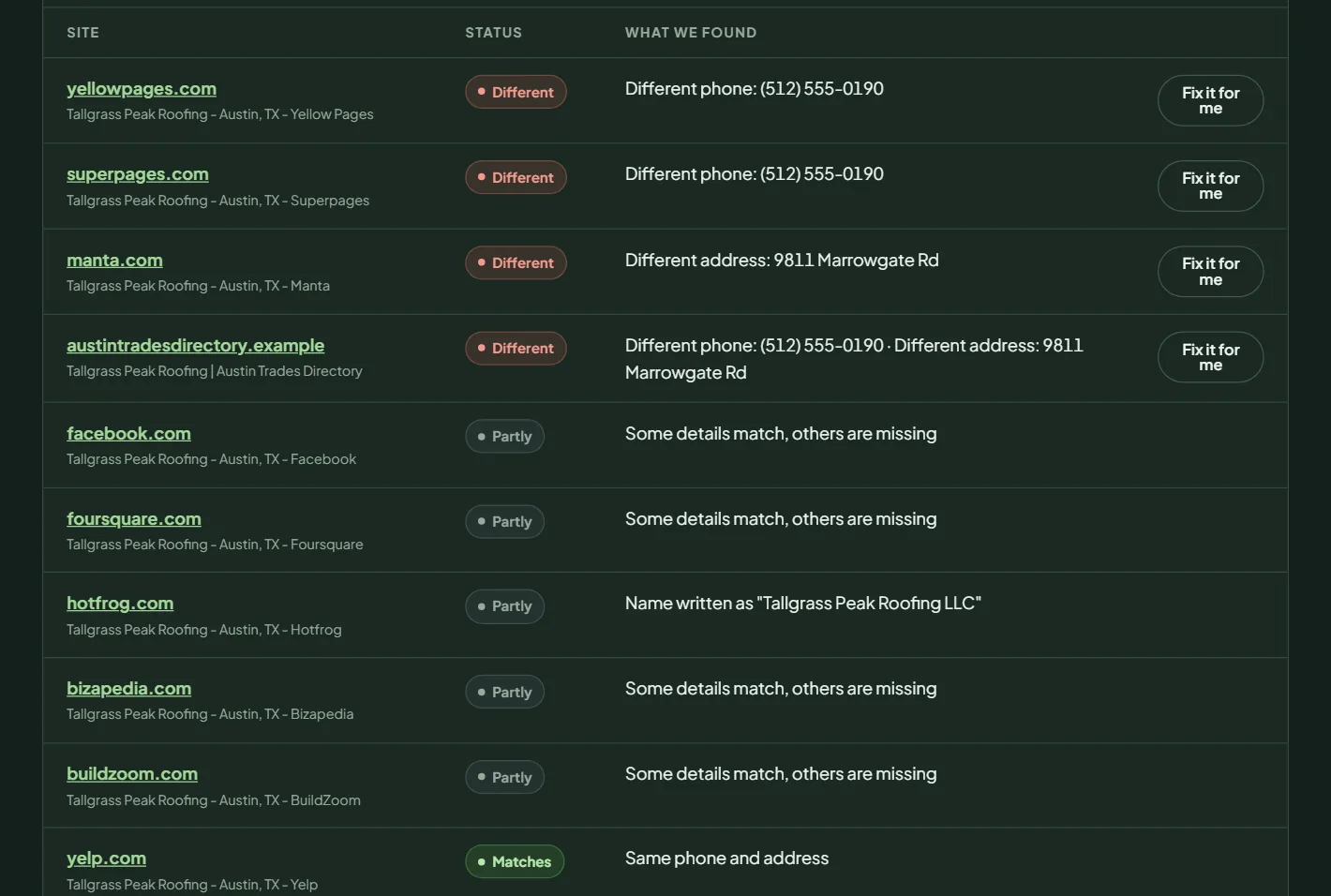 Listings with different details come first.
Other phone numbers used with your name, if any were found, and Duplicate Google profiles, each with an Open link. A duplicate splits your reviews. If it is yours, ask Google to merge it or mark it closed through Business Profile support.
Pages change, so open a source to confirm before you edit it.
What to do next
- Fix the Fix items in your Google profile basics.
- Update every Different listing with the details from Use exactly this, everywhere.
- Add the homepage schema if your website check shows it missing.
- Run a citation gap check to find directories you are not on yet, then check again.
Frequently asked questions
Which details count as correct?
The ones on your Google Business Profile. Pack Leader treats your Google profile as the source of truth and compares everything else with it.
Do I need to run Citation gaps first?
No, but it helps. The NAP check reuses the listings your citation gap check found, so with both you get a fuller list.
Why is a listing marked Partly?
Some details match and others are missing, or the name is written differently, for example with or without "LLC" or with different spacing.
Does Pack Leader change my listings?
No. It shows what to fix. You edit each listing yourself, or use Fix it for me to ask our team to do it.
Related articles
- How to find citation gaps in Pack LeaderFind the directory listings your Google Maps competitors have and you don't, in about 35 US directories, and read the results in Pack Leader.
- How to run and read an AI visibility checkSee whether ChatGPT, Gemini, Perplexity and Google AI Mode recommend your business, which competitors they name, and which sites they read.
- How to set up Brand identity in Pack LeaderSet your business, keywords and competitors once in Brand identity, and every Pack Leader tool uses them. Fill it in from your website for free.