How to write replies to your Google reviews in Pack Leader
Short answer: open Review replies in your workspace and click Scan my reviews to load up to your 200 newest Google reviews (8 credits). Then click Write reply on one review, or Write replies for N unanswered to draft them all. Writing uses credits per batch of up to 10 replies: 1 per batch. Read each draft, edit it if needed, click Copy, then Open on Google and paste it into your Google Business Profile. Pack Leader never posts to Google for you.
Replying to every review shows customers and Google that you care. Reviews also work best when your name, address and phone match everywhere, so run a NAP check too.
Load your reviews
- In your workspace, open Review replies in the sidebar.
- Click Scan my reviews. It takes about 30 seconds.
- Later, click Rescan reviews to add new reviews. Drafts you already have are kept.
You see four numbers: Reviews scanned, No owner reply, Drafts ready and 1-3★ reviews.
Write the replies
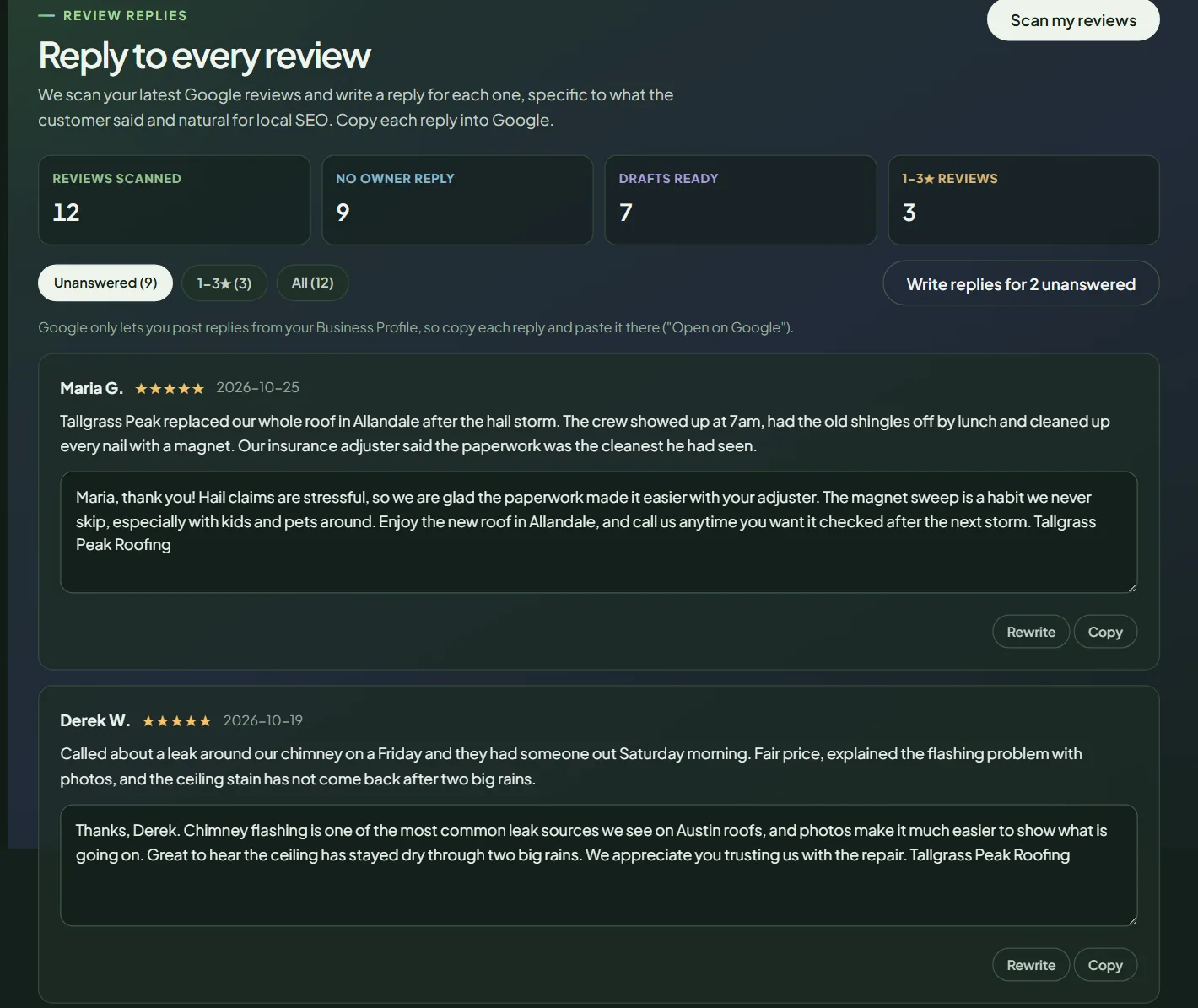 Draft replies for a sample business.
Use the tabs to choose what to see:
- Unanswered: reviews with no owner reply yet. Start here.
- 1-3★: your lower ratings, which need the most care.
- All: every scanned review.
Then:
- One at a time: click Write reply on a review. To get a different version, click Rewrite.
- All at once: click Write replies for N unanswered. Pack Leader writes them in batches of 10 and shows the progress.
| Action | Credits |
|---|---|
| Scan my reviews (up to 200) | 8 |
| Write reply or Rewrite (one review) | 1 |
| Write replies for N unanswered | 1 per batch of up to 10 |
Editing a draft uses no credits. If writing fails, the credits go back automatically.
How the drafts are written
Each draft:
- thanks the reviewer by first name and mentions one specific thing they said,
- mentions your service and city at most once, naturally, with no keyword stuffing,
- is 35 to 90 words, in plain, warm American English, and is signed with your business name,
- never invents facts, prices, licenses, guarantees or names, and never promises discounts. Where a detail is missing, you see a [placeholder] to fill in.
For 1 to 3 star reviews, the draft stays calm, takes responsibility where fair, never argues or shares private details, and invites the customer to call or message you to make it right. A review with a rating and no text gets a short, specific thank-you.
The services come from your Brand identity.
Post the replies on Google
- Read the draft and fix anything that is not right. Fill in any [placeholder].
- Click Copy.
- Click Open on Google and paste the reply into your Google Business Profile.
Every action uses credits from your one balance. See how credits work.
Frequently asked questions
Does Pack Leader post replies to Google for me?
No. Google only lets you post replies from your Business Profile. Copy each reply, click Open on Google and paste it there.
How many reviews can I load?
Up to your 200 newest Google reviews per scan. Rescanning adds new reviews and keeps the drafts you already have.
How should I reply to a negative review?
Stay calm, take responsibility where it is fair, never argue or share private details, and invite the customer to call or message you. Pack Leader's drafts for 1 to 3 star reviews follow these rules, but always read and edit them before posting.
Can I edit a draft?
Yes. Type in the reply box. Your edits are saved and use no credits.
Related articles
- How to set up Brand identity in Pack LeaderSet your business, keywords and competitors once in Brand identity, and every Pack Leader tool uses them. Fill it in from your website for free.
- How credits work in Pack Leader, and what each tool usesHow many credits each Pack Leader tool uses, how many each plan includes, when credits renew, how top-ups work, and what happens when a run fails.
- How to run a NAP check in Pack LeaderCheck that your business name, address and phone match your Google profile on your website and listings, find duplicate profiles, and get schema code.