How to build a money map in Pack Leader
Short answer: open Money map in your workspace and click Build my money map. Pack Leader pulls Google Ads search data for your services in your city, checks your Google Maps rank for each one, and shows Searches / month, what the same traffic would cost on Google Ads, the extra jobs you would get in the Maps 3-pack, and the revenue you miss today. It uses 70 credits and takes about 40 seconds. Set your own average job and close rate to make the numbers yours.
A money map tells you which service to win first: the one with the most searches, the biggest job value and the weakest rank.
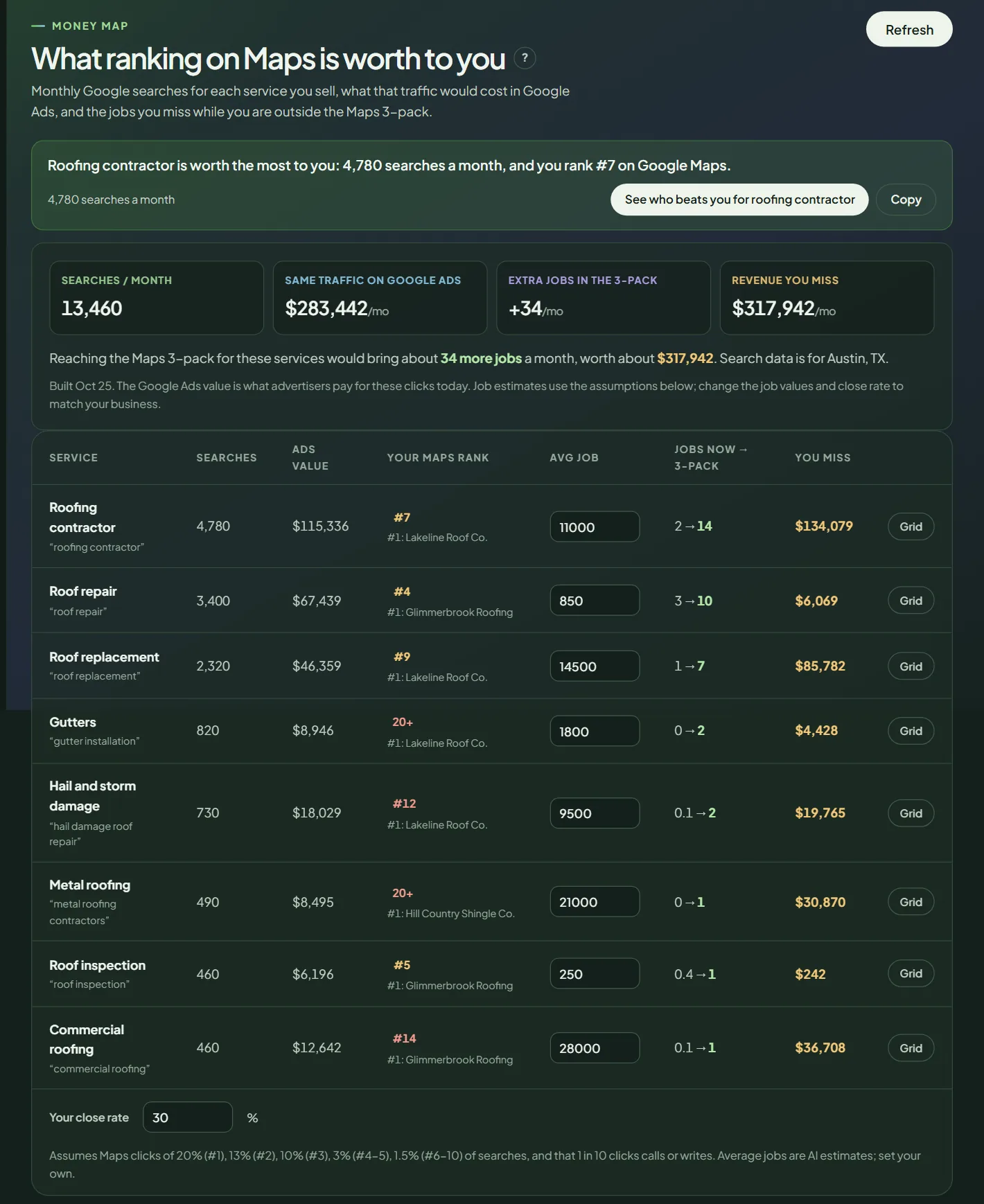 A money map for a sample business.
Build the map
- In your workspace, open Money map.
- Click Build my money map, then confirm. Pack Leader shows the credits it will use.
- Wait about 40 seconds. To update it later, click Refresh.
The map starts from the first 3 services in your Brand identity, groups the related searches into up to 8 services, and checks your Maps rank for each one from your business location.
Read the map
The four numbers:
- Searches / month: total monthly Google searches for your services.
- Same traffic on Google Ads: what you would pay for those clicks with ads.
- Extra jobs in the 3-pack: the jobs you would win each month if you ranked in the top 3 for every service.
- Revenue you miss: those extra jobs times your average job.
The table, one row per service: Searches, Ads value, Your Maps rank (with who ranks #1), Avg job, Jobs now → 3-pack and You miss. The Grid button opens a local grid for that service, so you can see where you rank across your area.
Make the numbers yours
- Avg job: Pack Leader estimates a value per service. Type your real average.
- Your close rate: the share of calls that become jobs, 30% by default.
The numbers update on screen right away. They are not saved.
How it estimates jobs: Maps click shares of about 20% for #1, 13% for #2, 10% for #3, 3% for #4 and #5 and 1.5% for #6 to #10, and 1 in 10 clicks calling or writing. These are planning assumptions, not a forecast.
What to do next
- Pick the service with the largest You miss where you rank outside the top 3.
- Check whether your categories fit it with a category check.
- Run a grid for it, then work on the gaps your gap report shows for that service.
Frequently asked questions
Where do the search numbers come from?
From Google Ads search data for your services in your city. If Google has no data for your city, Pack Leader uses the whole US and says so above the table.
Are the revenue numbers real?
They are estimates. They use typical Maps click shares by rank, an assumption that 1 in 10 clicks calls or writes, an AI estimate of your average job and your close rate. Set your own average job and close rate for numbers that fit your business.
Are my edits saved?
No. Average job and close rate change the numbers on screen only. Note your values if you want to reuse them.
Related articles
- How to run a local grid scan (and read the colors)Run a Pack Leader local grid to see your Google Maps rank point by point around your business, read the colors, and find out why you miss the 3-pack.
- How to set up Brand identity in Pack LeaderSet your business, keywords and competitors once in Brand identity, and every Pack Leader tool uses them. Fill it in from your website for free.
- How to check your Google Business Profile categories in Pack LeaderSee which Google Business Profile categories the businesses in the Maps 3-pack use for your keywords, and which primary and secondary categories to set.