How to run a local grid scan (and read the colors)
Short answer: open Local grid in your workspace, type a keyword, choose a grid size (3×3, 5×5 or 7×7) and a radius in miles, then click Run grid. Pack Leader runs the same Google Maps search from every point of the grid around your business and shows your rank at each point. Green is the 3-pack (1 to 3), amber is 4 to 10, red is 11 to 20 and gray is 20+, not in the top 20. A 5×5 grid uses 10 credits and takes about 20 seconds.
A grid answers a question a single rank check cannot: where in your area do customers see you in the Maps 3-pack, and where do they see your competitors instead. For the background, see the Google Maps rank checker page.
Run a grid
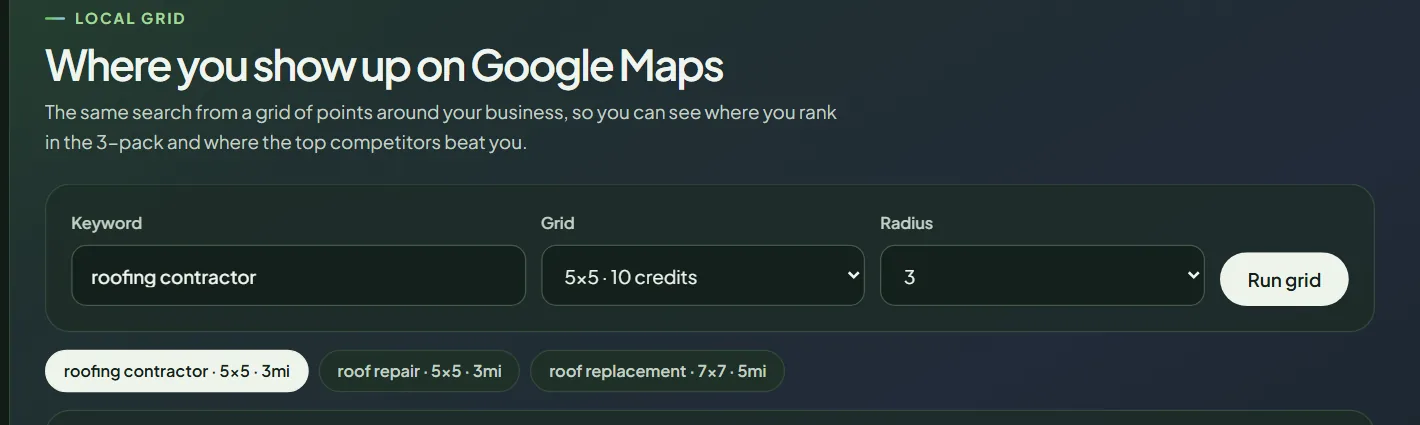 The grid settings. The size menu shows the credits each size uses.
- In your workspace, open Local grid in the sidebar.
- Keyword: type the search, for example "roof repair". Your saved keywords are suggested.
- Grid: choose the size.
- Radius: choose 1, 2, 3, 5 or 10 miles. The default is 3.
- Click Run grid. You see the progress as points finish.
| Grid size | Points | Credits |
|---|---|---|
| 3×3 | 9 | 4 |
| 5×5 | 25 | 10 |
| 7×7 | 49 | 20 |
The radius is the distance from the center to the edge of the grid. On a 5×5 grid with a 3 mile radius, the points are 1.5 miles apart.
Where the center is: your business location on Google. For a service area business with no public address, it is the middle of the Maps results for your city. If the grid page asks you to Run a new audit first, re-run your gap audit so Pack Leader has your location.
Read the grid
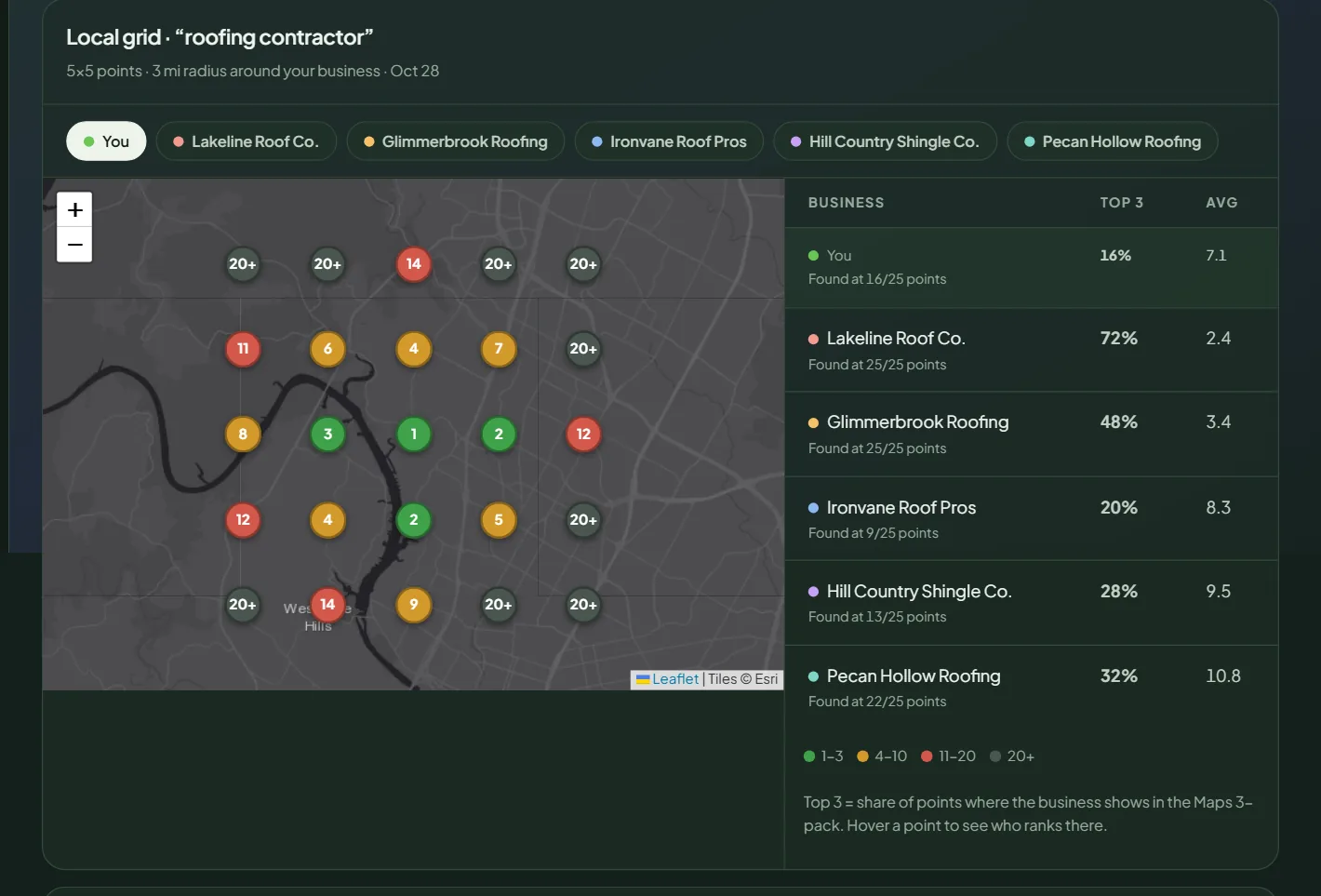 A 5×5 grid with a 3 mile radius for a sample business.
The map. Each pin is one search from that spot. The number is your position in the top 20 Google Maps results there.
| Color | Rank | What it means |
|---|---|---|
| Green | 1 to 3 | You are in the Maps 3-pack here. |
| Amber | 4 to 10 | Close, but below the 3-pack. |
| Red | 11 to 20 | Far down the list. |
| Gray | 20+ | Not in the top 20. |
The tabs above the map switch between You and each competitor, so you can see where they win. Hover a point to see the top 3 businesses there.
The table lists you and each competitor:
- Found at X/25 points: how many points show the business in the top 20.
- Top 3: the share of points where the business is in the Maps 3-pack. This is the number to grow.
- Avg: the average rank at the points where the business was found.
Each grid is saved. Your last 30 grids appear as tabs above the map, named by keyword, size and radius, so you can compare before and after a change.
Find out why you miss the 3-pack
Under a finished grid, click Diagnose this grid (3 credits). For each point where you miss the 3-pack, Pack Leader compares you with the businesses that rank there and names the main reason:
- Too far: you are much further from that point than the businesses in the 3-pack.
- Category: most of the 3-pack uses a primary category you don't have.
- Fewer reviews: even the weakest business in the 3-pack there has more reviews than you.
- Lower rating: your rating is clearly below theirs.
- Website and profile: none of the above, so the gap is in your website or profile.
You also get a "what if" slider. Move it to see the estimated share of points in the 3-pack with more Google reviews, and, when category is a reason, with their primary category. It is an estimate with everything else equal, not a promise.
What to do with the result
- If most red and gray points are far from you, that is distance. Grow there with a service area page for that town and reviews from customers there.
- If competitors win close to your business, run a gap audit and close the Google profile gaps first.
- Run the same keyword, size and radius again after your changes, and compare the Top 3 share.
Every grid uses credits from your balance. See how credits work.
Frequently asked questions
Which grid size should I use?
Start with 5×5 (10 credits). Use 3×3 (4 credits) for a quick check of a small area, and 7×7 (20 credits) when you serve a large area and want more detail.
What radius should I pick?
Pick the distance customers actually travel or you actually drive. For most service businesses in a city, 3 miles is a good start. Use 5 or 10 miles for suburbs and rural areas.
Why do I rank well at one point and not at the next?
Distance is one of the strongest Google Maps factors. Close to your business you compete with fewer nearby businesses. Further away, businesses that are closer to the searcher take over.
Do failed points cost credits?
Failed points are retried once. Points that still fail are refunded in whole credits.
Related articles
- How to read your Pack Leader gap reportWhat the gap score, the Maps ranks, the gap checklist and the action plan in your Pack Leader report mean, and which gaps to fix first.
- How credits work in Pack Leader, and what each tool usesHow many credits each Pack Leader tool uses, how many each plan includes, when credits renew, how top-ups work, and what happens when a run fails.
- How to run a gap audit in Pack LeaderRun a Pack Leader gap audit in about 30 seconds. What to enter, how competitors are chosen, what it costs in credits, and what to do if it fails.