How to run a gap audit in Pack Leader
Short answer: go to the Pack Leader home page, enter 1 to 3 services your customers search, your city and state, and your business name exactly as it appears on Google. Click Run my gap audit, sign in with Google, and about 30 seconds later your workspace opens with the report. An audit uses 5 credits. When the report opens, Pack Leader also runs one 5×5 local grid on your first service automatically (10 credits, no separate confirmation), so your first audit uses 15 credits in total.
A gap audit compares your Google Maps profile and your website with the businesses that rank above you, then turns every gap into a fix. This page shows how to run one. To understand the result, read how to read your gap report.
What you need before you start
- Your business name as it appears on your Google profile. Pack Leader looks for this exact name on Google Maps.
- Your city and state, for example "Austin, TX".
- 1 to 3 services customers search, for example "roof repair", "roofing contractor" and "roof replacement". Each one needs at least 3 characters.
Use the words customers type into Google, not your internal service names.
Run an audit from the home page
- Open the home page and find the audit form.
- Under Services customers search (1 to 3), enter up to 3 services. Only the first one is required.
- Enter your City, state.
- Enter Your business (Google profile name).
- Optional: add a Must-include competitor. Leave it empty to compare with the top businesses on Maps.
- Click Run my gap audit →.
- Sign in with Google when asked. The sign-in only saves your workspace, and no card is needed.
Pack Leader then pulls the Google Maps results, finds your profile and your competitors, checks the websites and writes your action plan. When it is done, your workspace opens on the Gap audit page.
Run an audit inside your workspace
For the same business: open Gap audit and click Run new audit. Pack Leader asks you to confirm and shows the credits it will use. The new report is added to Audit history, which keeps up to 30 audits.
For a new business: click + Add business in the sidebar. You get the Set up a new business form.
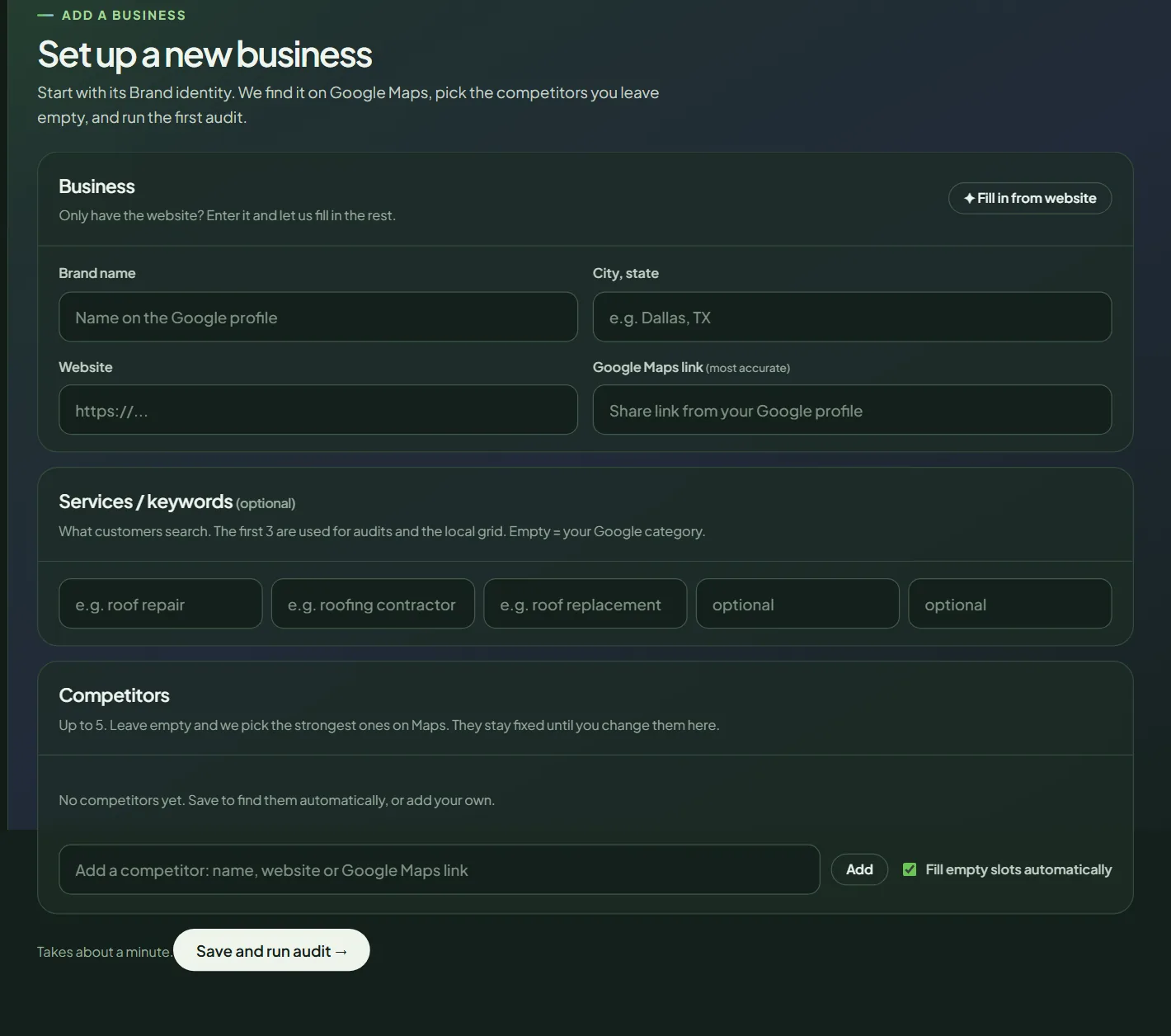 The Add business form in the workspace.
- Brand name, City, state, Website and Google Maps link. The Maps link is the most accurate way to find the right profile.
- ✦ Fill in from website reads your website and fills in the rest. It uses 0 credits.
- Services / keywords: up to 5. The first 3 are used for audits and the local grid. If you leave them empty, Pack Leader uses your Google category.
- Competitors: up to 5. Leave them empty and Pack Leader picks the strongest ones on Maps.
Click Save and run audit →. It takes about a minute.
How Pack Leader picks your competitors
For each service, Pack Leader searches Google Maps for the service plus your city, the way a customer would, and reads the top 20 results. A business scores more points the higher it ranks, across all your searches. The businesses with the highest scores become your competitors: 3 for an audit from the home page, or up to 5 when you set competitors in Brand identity. A must-include competitor always goes first.
What a gap audit costs
| What runs | Credits |
|---|---|
| Gap audit (up to 3 keywords) | 5 |
| 5×5 local grid on your first keyword, run automatically when the report opens (skipped if you already have a grid for that keyword since your last Brand identity change) | 10 |
Credits are charged when the audit starts. See how credits work for plans, top-ups and refunds.
If the audit fails
A failed audit gives your credits back automatically. These are the messages you may see and what to do:
- "We couldn't find [business] on Google Maps in [city]": enter the exact name from your Google profile, or add your Google Maps link in Brand identity.
- "Google Maps returned no businesses for these searches": use a broader service or a bigger nearby city.
- "Maps data is unavailable right now": wait a minute and try again.
- "This took too long and was stopped": run it again. The credits were returned.
If you reach your plan's business limit, Pack Leader tells you how many businesses your plan includes. Re-auditing a business you already have still works. To add more, compare plans on the pricing page.
Next steps
- Read your gap report: the score, the checklist and the action plan.
- Run a local grid to see where you rank across your area.
- Learn what the audit checks on the local SEO audit tool page.
Frequently asked questions
How long does a gap audit take?
About 30 seconds. It keeps running if you switch sections or close the tab, and you get an "Audit finished" message when it is ready.
Can I choose my own competitors?
Yes. On the home page, add one must-include competitor. In your workspace, open Brand identity and add up to 5 competitors by name, website or Google Maps link. Empty slots are filled with the strongest businesses on Maps.
Does a failed audit cost credits?
No. If an audit fails or takes too long, the credits go back to your balance automatically.
Can I audit a client's business?
Yes. Each business gets its own workspace. Your plan sets how many businesses you can have, from 1 on Free to 25 on Agency.
Related articles
- How to read your Pack Leader gap reportWhat the gap score, the Maps ranks, the gap checklist and the action plan in your Pack Leader report mean, and which gaps to fix first.
- How to run a local grid scan (and read the colors)Run a Pack Leader local grid to see your Google Maps rank point by point around your business, read the colors, and find out why you miss the 3-pack.
- How credits work in Pack Leader, and what each tool usesHow many credits each Pack Leader tool uses, how many each plan includes, when credits renew, how top-ups work, and what happens when a run fails.